
Add a Conversion Block to your theme
Add any Conversion Block with Edit In Theme or from the theme editor's Apps tab, then save it so shoppers see it.
Click Edit In Theme on a block's card, or add the block yourself in Shopify's theme editor. Nothing goes live until you click Save.
Moving a bundle widget? Bundles aren't Conversion Blocks. Read My bundle widget is in the wrong place or under the description
Before you start
- You need Section Store Plus or its free trial.
- You need an Online Store 2.0 theme.
Add a block from the app
- In Shopify admin, open Apps → Section Store → Conversion Blocks.
- Find the block's card and click Edit In Theme.
- Pick your theme. Your live theme has a green dot.
- The theme editor opens in a new tab on your default product template, with the block added.
- Drag the block where you want it.
- Change its settings in the right panel.
- Click Save.
The block now shows on every product that uses that template.
Add a block in the theme editor
Use this path to add a block to another template. Every block also has a card in the app.
In Shopify admin, open Online Store → Themes.
Click Customize on your theme.
In the page picker at the top, choose Products, then your template.
In the left sidebar, click Add block inside Product information.
Type the block's name in the search box and open the Apps tab.
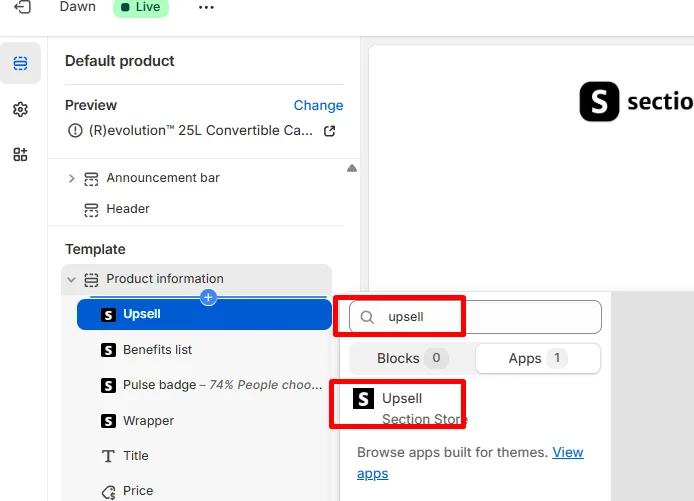
Click the block. You see Section Store under its name.
Change its settings.
Click Save.
Horizon themes
Horizon-family themes group the title, price and buy buttons together. Add the block inside that group. If Edit In Theme puts the block outside your buy box, drag it into the group.
If it doesn't work
- The block isn't in the list: see the missing block article below.
- The card says Subscribe to unlock: Plus isn't active. Start Plus or the free trial first.
- No themes show under Edit In Theme: reload the page and try again. You can also use the theme editor path above.
- You saved but shoppers don't see it: see the live store article below.
Related
- Conversion Block missing from the theme editor's Apps list
- Conversion Block not showing on my live store
- Show different Conversion Blocks on different products
- Remove a Conversion Block from your theme
Also searched as: add block, install block, add app block, edit in theme, how to add conversion block, where are the blocks, add block to product page, add block apps, theme editor, customize theme
Did this answer your question?