
Upsell & Addon Discounts
Our upsell and addon sections don't add a discount to your product. These sections can show promo text to reinforce a discount you set with a Shopify automatic discount. The Upsell and Addons Conversion Blocks have no promo text setting.
It should be a combination of Shopify automatic discount + our Upsell section.
You just need to go to your Shopify admin > Discounts > Create discount > Amount off products > Automatic discount:
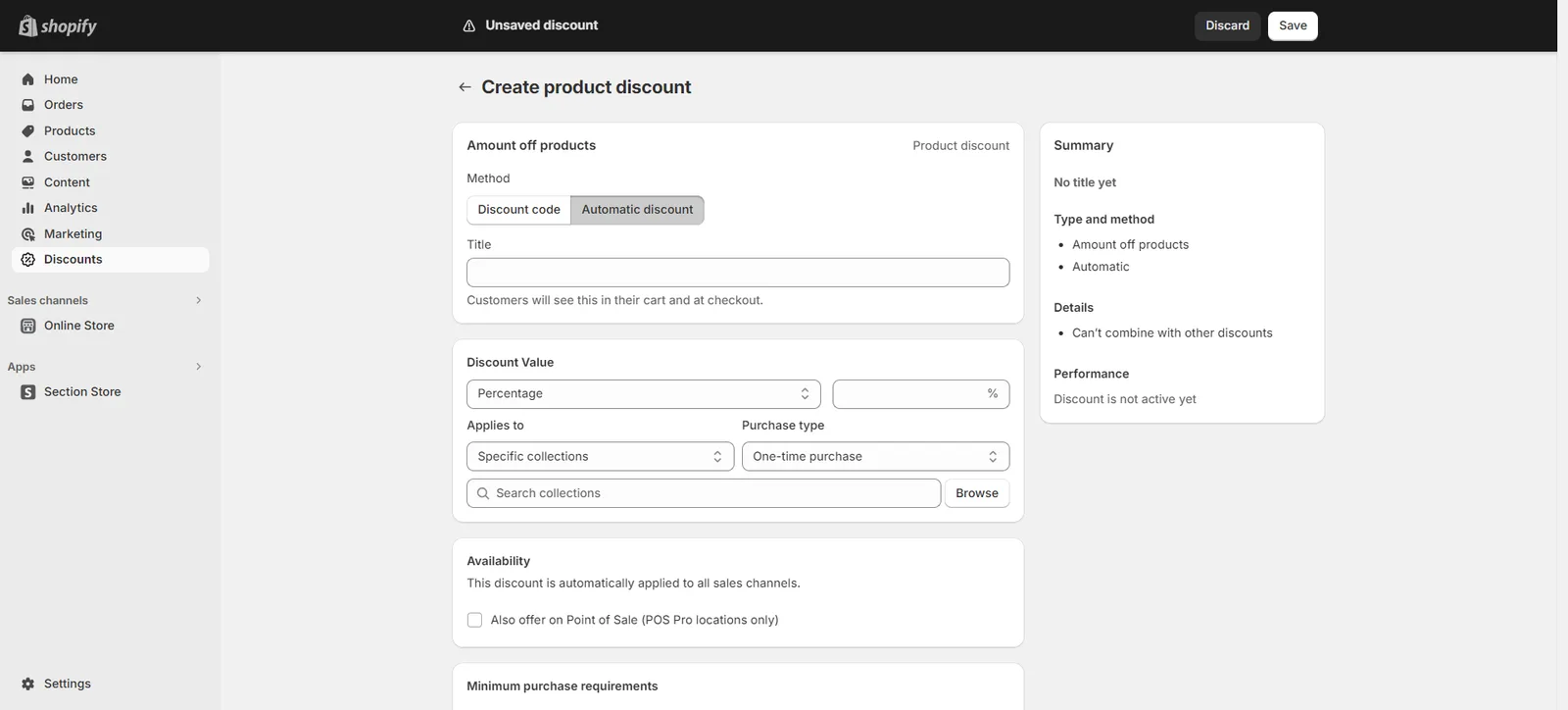
You will then just have to customize it as per your preference.
To learn more, you can check Shopify's article here:
Related articles
Also searched as: add on, add to cart, add-on, addon, addon discount, addon price, amount off products, automatic discount, automatic discount setup, bundle discount, buy x get y, cart total wrong, create discount, cross sell discount, discount, discount code, discount in cart, discount missing, discount not applied, discount not working, discount setup, discount text, does the section apply discount, free gift, how to add a discount, no discount, no discount at checkout, percentage off, price not discounted, promo text, set up discount, shopify discounts, upsell, upsell discount, upsell price, why no discount showing
Did this answer your question?