
How to use AI Pages
AI Pages builds home, product and other pages in your theme, with copy and images. Learn the whole flow, from opening it to going live.
AI Pages builds a home page, a product page or any other page inside your own theme. It plans the layout, writes the copy, makes the images and adds the sections. Nothing goes live until you assign, publish or switch.
Before you start
- You need an active Section Store Plus subscription. A free trial counts.
- Each build uses one credit. Every store gets 5 free credits. The app shows your balance as builds left.
- Pick a theme you control. Shopify demo themes don't work.
Build your first page
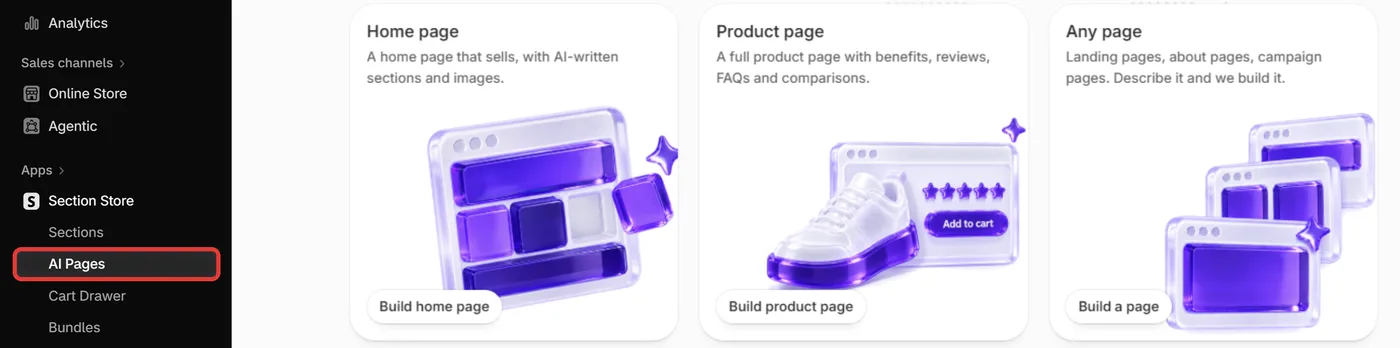
In Shopify admin, open Apps → Section Store → AI Pages.
Pick a card:
- Home page, then Build home page.
- Product page, then Build product page.
- Any page, then Build a page. Use it for about, landing, campaign, FAQ and contact pages.
Fill in the form and click the Generate button. You see the steps as the page builds.
When the page is ready, click Open theme editor to review it.
Make it live. The last step depends on the page:
- Product page: click Assign to your product, or Choose products.
- Home page: click Use as home page.
- Any page: click Publish page.
- Imported product: click Publish product.
You can close the window during a build. The build keeps going. Find it under Recent pages on the AI Pages screen.
Other ways in
- Home: the AI Pages tool in the Plus card has a Plan a page button. After your first build it reads Build a page.
- Conversion Blocks: Set up with AI opens the same builder with Buy box only checked. It's one feature, not a second tool.
- Store audit: a product page row opens a build on your best seller. A conversion blocks row opens Buy box only.
- Shopify Sidekick: the Build a product page with AI Pages action opens AI Pages for one product.
Related
- Build a product page with AI
- Build a home page with AI
- Build an about us, contact, landing or FAQ page with AI
- Import a product from AliExpress or CJdropshipping
- How many pages can I build with AI Pages?
- Will AI Pages change my live store?
- What AI Pages can't do
- AI Pages: full guide
Also searched as: ai pages, ai page builder, build page with ai, page generator, create page with ai, ai store builder, build my store with ai, ai website builder, where is ai pages, how to use ai, how does ai pages work, ai pages tutorial, aipages
Did this answer your question?