
Import a product from AliExpress or CJdropshipping
Paste an AliExpress or CJdropshipping link to create a draft product with prices, photos and its own AI page. Then publish it.
Paste a product link into AI Pages. We create a draft product in Shopify with prices, photos and variants, and build its page. You review it and publish it from the app. The import doesn't place supplier orders or sync stock.
Before you start
- You need an active Plus subscription and one credit.
- Use a full product link ending in .html:
- AliExpress: aliexpress.com or aliexpress.us, like aliexpress.com/item/1005001234567890.html.
- CJdropshipping: cjdropshipping.com, like cjdropshipping.com/product/your-product-p-1234567890.html.
- Short share links don't work. Open the link in your browser and copy the full address.
- Shopify asks for access to products and files the first time.
Import the product
In Shopify admin, open Apps → Section Store → AI Pages.
On the Product page card, click Build product page.
Pick Full product page, Buy box only or Sections only. Click Continue.
Under Made for, pick Import from link. With Full product page or Sections only, a store with no products starts here.
Paste the link into Product link. The photo, name and prices appear after a moment.
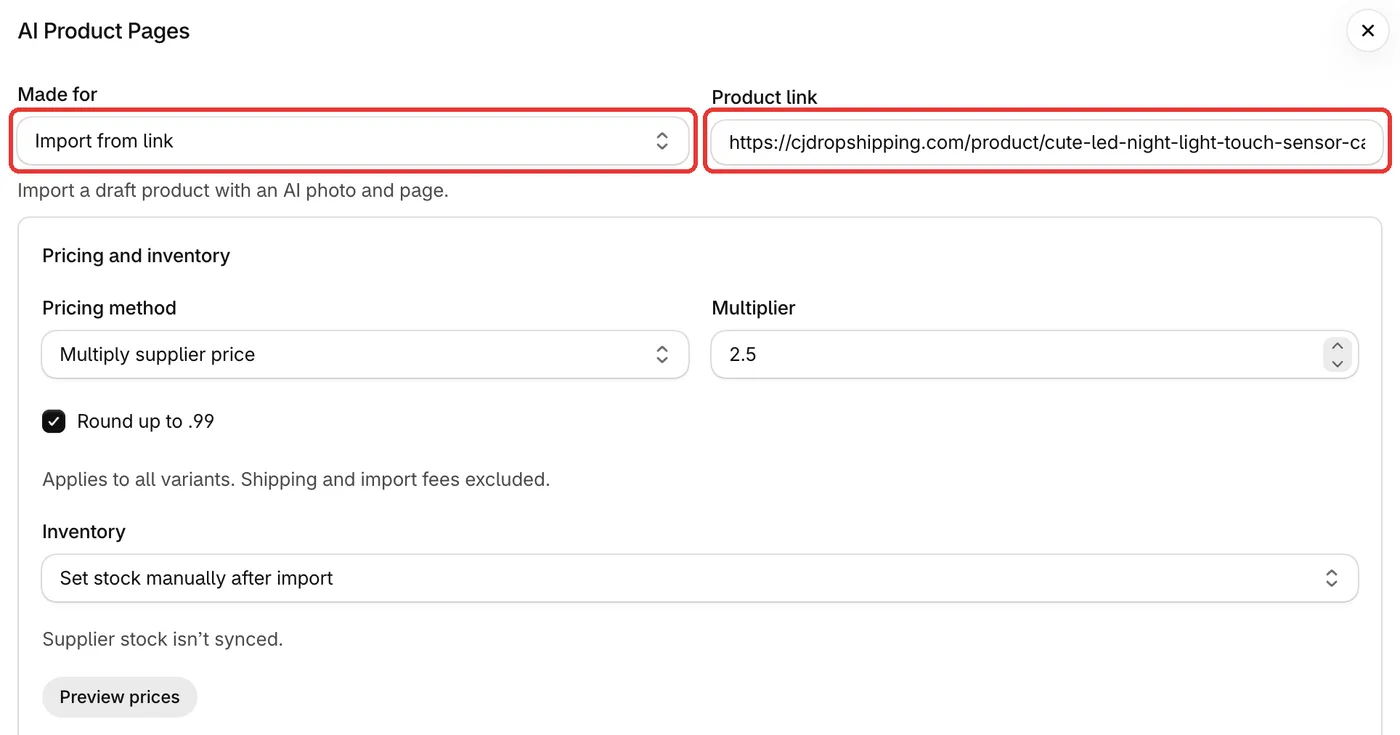
Under Pricing and inventory, set your prices and pick how to handle stock. Remove variants you don't want.
Optional: set In the style of and Colors.
Click the Generate button. Allow access if Shopify asks. You see "Reading your product…", then "Your draft is ready. Creating its featured photo…". An import takes a few minutes more than a normal build. You can close the window.
Click Review product to check the draft in Shopify. Click Edit page to open the page in the theme editor.
Click Publish product.
What you get
- A Draft product with its page already assigned.
- A short, clear name of up to 70 characters, not the supplier's long title.
- A description of up to 120 words, and search text, in your store's language.
- One new AI featured photo, the best three supplier photos and any variant photos. If the AI photo fails, you keep the best four supplier photos.
- Your variants and selling prices. We save the supplier price as the variant's cost.
If it doesn't work
- "Paste a full AliExpress or CJdropshipping product link ending in .html." It's a short link or a page that isn't a product. Copy the full address from your browser.
- The product shows Sold out. You picked Set stock manually after import. Add stock in Shopify.
- Another error. See the import errors article. A failed import gives its credit back.
Related
- Set prices and variants for an imported product
- Publish an imported product
- Why did my AliExpress or CJdropshipping import fail?
- Does the import sync stock or send orders to the supplier?
- Why does my imported product show Sold out?
Also searched as: aliexpress, ali express, aliexpres, aliexpress import, import from aliexpress, aliexpress link, aliexpress product, cjdropshipping, cj dropshipping, cj, import from cj, dropshipping, drop shipping, dropship, dropshipping product, import product, import from link, import product from url, add product from link, product link, paste link, paste url, supplier link, link not working, invalid link, short link, share link, draft product, featured photo, ai product photo, ai pages import
Did this answer your question?