
Show bundles on your product page with the Bundles app embed
Turn on the Bundles app embed once and your bundles show right above Add to cart.
Bundles show on your product pages through the Bundles app embed. Turn it on once and click Save in the theme editor. Your bundles then show right above the quantity selector and Add to cart, on any product with a live bundle.
Before you start
- You need active Section Store Plus. Shopify only offers the embed while Plus is active.
- Publish at least one bundle.
Turn it on from the Bundles page
In Shopify admin, open Apps → Section Store → Bundles.
Find the Theme setup card and click Turn on in theme. When a live bundle isn't on your store yet, the card sits at the top of the page as Turn on bundles in your theme. The card shows once you have a bundle.
The theme editor opens on a product page with Bundles switched on. Click Save at the top right. Until you save, shoppers see nothing.
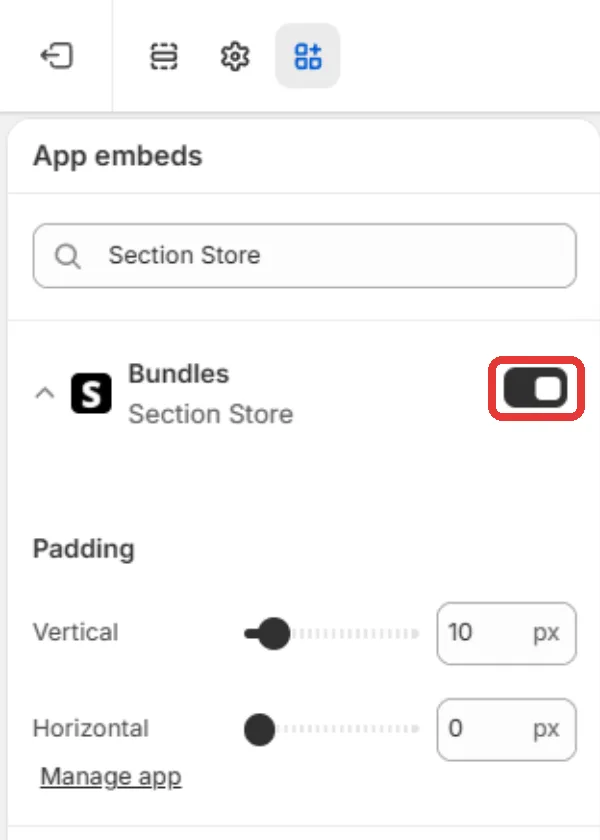
Go back to Section Store. The card shows Live on your store, and its button reads Open theme. It can take up to 5 minutes.
Turn it on from the bundle editor
- Open a published bundle. If you see Your bundle isn't on your store yet, click Turn on.
- Click Save in the theme editor.
- Back in the bundle editor, click I've done it.
Turn it on by hand
- In Shopify admin, open Online Store → Themes.
- Click Customize on your live theme.
- Click the App embeds icon in the left bar.
- Turn on Bundles.
- Click Save.
Good to know
- Only your published theme counts. An embed turned on in an unpublished copy does nothing yet.
- A Bundle block you placed by hand takes priority over the embed.
- Bundles only show on products that have a live bundle.
- With no standard Add to cart button, the bundle shows right after the price.
- Open the Bundles embed in the theme editor and change Padding for more space. Vertical starts at 10 px and Horizontal at 0 px.
If it doesn't work
- We couldn't check your theme on the card: we couldn't read your theme. Check your product page by hand.
- The bundle still doesn't show: read Why isn't my bundle showing on my product page?
Related
- Place a bundle with the Bundle app block
- My bundle widget is in the wrong place or under the description
- Which themes work with bundles?
Also searched as: bundles app embed, bundle app embed, app embed bundles, app embeds, turn on in theme, turn on bundles, enable bundles, activate bundles, show bundles on product page, bundle above add to cart, where does the bundle show, theme editor app embed, bundle live on your store, your bundle isn't on your store yet, bundle not on store, quick setup guide, theme setup, turn on bundles in your theme, i've done it, bundle padding, bundle spacing, no add to cart button, bundle block priority, manual bundle block
Did this answer your question?